In this guide
For most Boston employee records, start by naming the task. Use the official Access Boston portal to reach the applications assigned to your account; use Employee Self-Service (ESS) for listed personal, financial and time tasks; use Beacon for Human Resources information and inquiries. The City’s public ESS page lists paychecks, direct deposit, tax forms, absence requests and personal details. The current City HR page describes Beacon as an HR portal and contact center. This guide maps those jobs without collecting employee information.
If you came here for a paycheck, W-2, direct deposit or absence balance, the short answer is usually ESS. If you need an HR answer, policy or case, start with Beacon. If the assigned application itself will not open or its tile is missing, Access Boston and the application owner become relevant. Use the matching task guide below; an account login article would not answer what appears inside an employee record.
The route in one minute
| What you need | First place to check | What the public source says |
|---|---|---|
| Paycheck or pay statement | ESS → Finances & Time Tracking | The employee handbook directs employees to paycheck details in ESS. Pay frequency depends on job group. |
| Direct deposit election | ESS → Direct Deposit | The handbook describes an ESS tile reached through Access Boston or Beacon; follow the current secure form. |
| W-4, W-2 or 1095 record | ESS | BPS Office of HR lists these financial records in ESS. A record location is not tax advice. |
| Absence request or balance | ESS | BPS Office of HR lists absence requests and balances among ESS tasks. Department rules govern approval. |
| HR question, inquiry or case | Beacon | The City describes Beacon as an online HR portal and HR contact center. |
| A missing app tile or sign-in issue | Access Boston / IT owner | The City FAQ says application approvals and role changes can affect available tiles. |
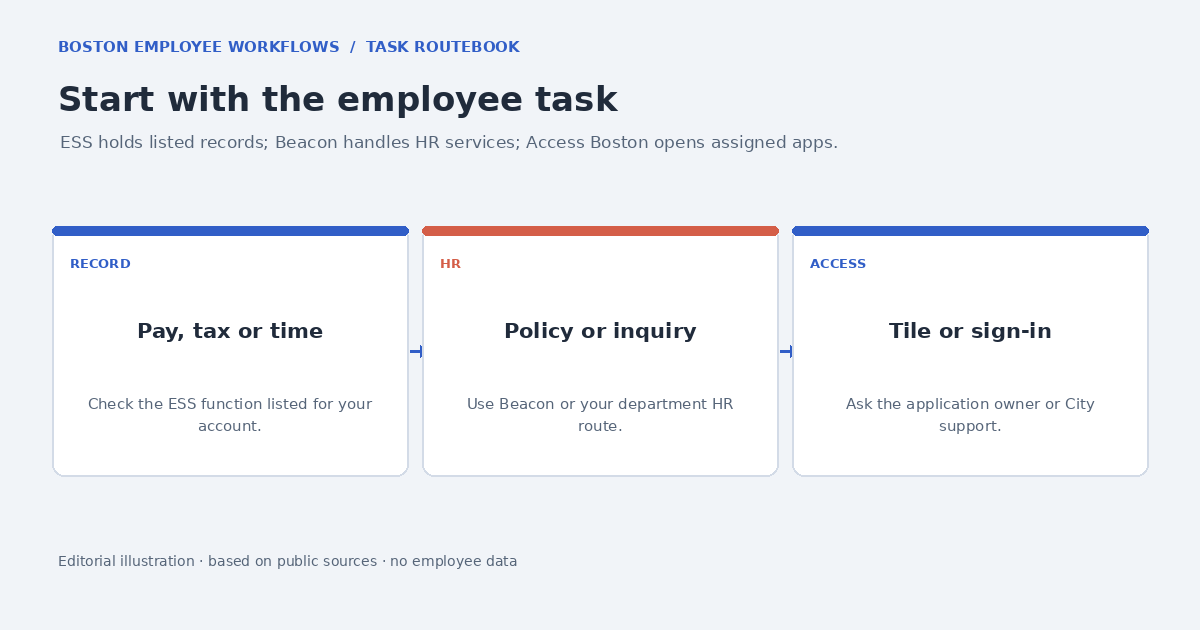
What Access Boston does in this map
Access Boston is the employee account and application starting point. It is the front door you use to reach the tools available to your account, but it is not the record system for each task. If the ESS tile opens, a pay statement belongs to the employee record in ESS; if Beacon opens, an HR case belongs to the HR service. Solving a tile problem and solving a payroll question are separate routes even when both began at the same portal.
The City’s Access Boston FAQ says some applications require approval and that tiles may change after a role, department or sponsored-account change. That document was updated October 2, 2023, so treat its examples as background and verify current instructions with your department. A missing application after a successful sign-in does not, by itself, show that a pay record or HR case has been deleted.
ESS is a record tool, not a policy answer
The BPS Office of Human Resources ESS page groups the listed work into personal information, finances and time tracking. Examples include address and emergency-contact details, paycheck, direct deposit, W-4/W-2/1095 forms, and absence requests or balances. The page is a useful menu of possible functions, not a promise that every feature appears for every employee group. Access, approval steps and the underlying policy can differ by department or classification.
Use ESS to inspect or submit the record the screen actually offers. Use your department’s HR or payroll guidance for questions about eligibility, a deadline, an absence category, an adjustment or a missing record. A balance displayed on screen does not automatically determine what leave is approved; a tax form stored in ESS does not explain how to complete a return. The focused guides keep those record-location questions separate.
Beacon handles HR information and inquiries
The live City Human Resources page describes Beacon as both an online employee HR portal and a contact center. It tells current employees how to reach the portal through Access Boston and where to submit HR inquiries. Use the current page for contact information, hours and any current response guidance because those details may change. Beacon is the relevant route when you need an HR service to interpret a policy or review a case; Access Boston only provides the application route.
Before opening an inquiry, identify the question you want answered and the department or employee group involved. Use the official form or contact channel for any private employment details, and include only what that secure process requests. Do not send a pay statement, tax document, Social Security number or account screenshot to this independent guide. The Beacon article explains how to distinguish an HR inquiry from an ESS record task.
The City HR page says that full- and part-time City employees, including Boston Public Schools employees, can use the Beacon HR Portal and Contact Center. It also describes a 15-minute inactivity timeout for the Beacon session. Treat both as current-page information that should be checked again before relying on it; a session ending does not mean an HR inquiry was submitted or that its saved status disappeared.
For portal access, the City page says employees open the Beacon tile in Access Boston. For the HR answer itself, use Beacon’s resource or inquiry functions. A screen that links from Beacon to another employee system may hand off the task to ESS; return to the HR inquiry if the question still needs interpretation after you have checked the record.
How payroll timing changes the answer
The City employee handbook says pay frequency can be weekly or biweekly depending on job group. It also notes that Boston Public Schools is an exception to the handbook’s general statement about the prior-period Friday pay date. That means a citywide calendar found in a search result may not answer when a particular employee is paid. Check the schedule that applies to your job group, contract and department.
For a missing or unexpected payment, compare the pay period and statement in ESS with the schedule and any official payroll notice. If the record itself is absent or incorrect, raise it through your department’s authorized payroll or HR route. A portal can deliver a statement without determining whether hours, deductions, classification or a payroll correction are correct. The paycheck guide explains what to inspect and where the handbook draws its limits.
A safe sequence for any employee task
- Write down the outcome in ordinary terms: find a statement, update an election, submit an absence request, or ask an HR question.
- Open Access Boston from a trusted City source, then choose the ESS or Beacon function that matches that outcome.
- Check whether the page is showing a record, an editable request, a policy explanation or a status. These are not interchangeable.
- If the tile is absent, separate the access problem from the employee-record question and ask the assigned application owner or department IT.
- Use an official secure channel for private account details. This publisher does not accept employee records or credentials.
This short sequence prevents several common detours: asking IT to interpret a tax form, asking payroll to restore a tile, or submitting a general HR inquiry when the screen already shows a payroll record discrepancy. It also creates a useful description for the team that owns the next step: which application, which task, which date or pay period, and what non-sensitive status appeared.
The guides by task
Use the paycheck guide to read the ESS statement and distinguish the schedule question from a record error. The direct-deposit guide covers the secure election route and verification. For a tax record, use W-4, W-2 and 1095 in ESS. For time away, see absence requests and balances. For profile details, see personal information in ESS; for a question needing HR interpretation, use Beacon inquiries. If a tile or assigned access is missing, see the Access Boston and ESS access guide.
These routes describe public documentation, not the private configuration of a reader’s account. An employee group may have a different screen, designated payroll contact or approval chain. If a current City screen or department notice differs from this summary, follow the current official instruction and send the publisher a correction only if a public source has changed.
Official sources and limits
- BPS Office of Human Resources: Employee Self-Service
- City of Boston Human Resources: Beacon
- City employee handbook: Compensation
- Access Boston FAQ (updated October 2, 2023)
- Access Boston portal
Source check: 2026-09-27. Access and employee policies can vary by department, employee group and record. Follow the current official screen or your department’s instructions when they differ from this independent guide.